
How to Enable & Track Real-Time Post Views in Vedanta Software Newsportal CMS
Posted By Ankur Gupta On 25 Nov 2025 11:44:07 Under Articles

Knowing how many people are reading your articles is one of the most powerful insights for any news website. It helps editors understand audience behavior, improve content strategy, and boost overall engagement.
In this guide, we’ll show you how to enable Post Views Feature and display view counts on your news portal using Vedanta NewsPortal CMS.
🔍 Why Track Post Views?
Post views help you:
- Identify trending and popular news
- Improve editorial decision-making
- Understand what your audience likes to read
🛠 Step 1: Enable Post Views Feature
1️⃣ Go to System
2️⃣ Click Settings
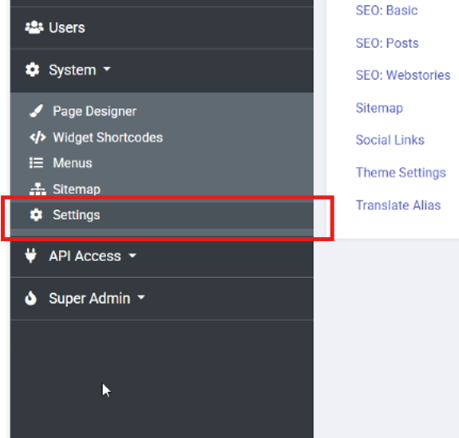
3️⃣ Select News Portal Settings
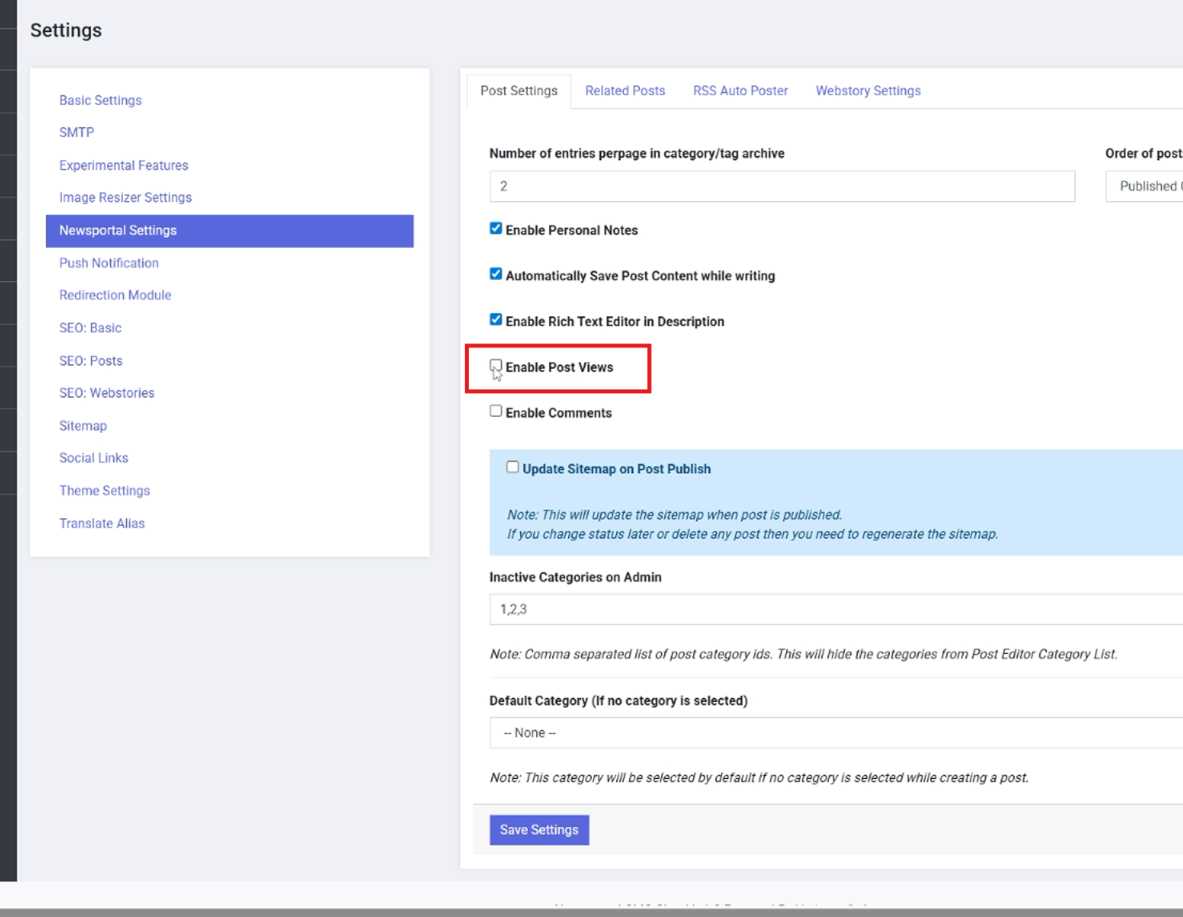
4️⃣ Find the option Enable Post Views
5️⃣ Check the box and Save Settings
Now the Post Views column will appear in the posts list — right beside the status.
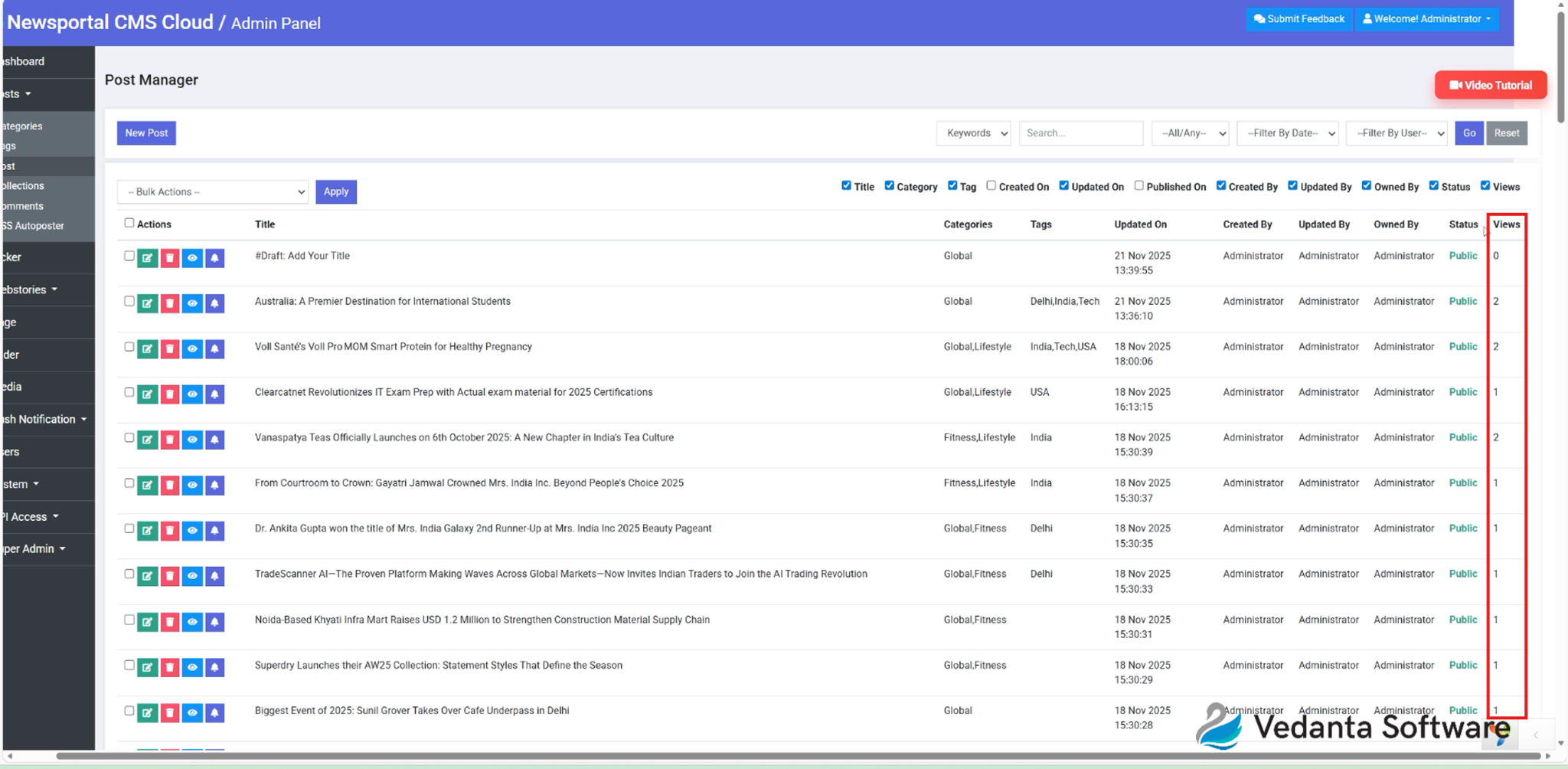
👀 Step 2: Track Views Accurately
When you open a news post while logged in, the views will NOT increase.
Why? Because Vedanta CMS does not count view hits from logged-in users to avoid incorrect tracking and inflated data.
To verify views:
- Copy the post URL
- Open it in a private/incognito window
- Refresh the post list page → The view count will increase
This ensures:
- No fake counts
- Accurate audience analytics
🖥 Step 3: Display Post Views on Your Website
If the view count is not visible on the post page, follow these steps:
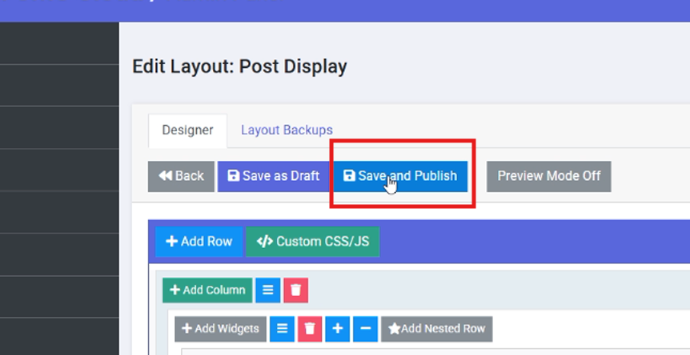
- Go to System → Page Designer
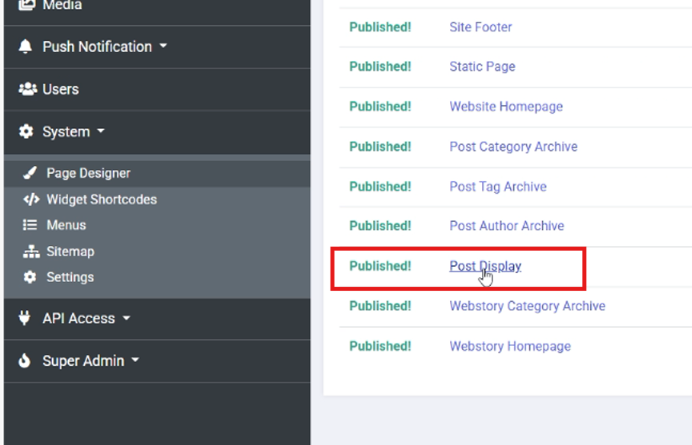
- Select Post Display
- Click Add Widget
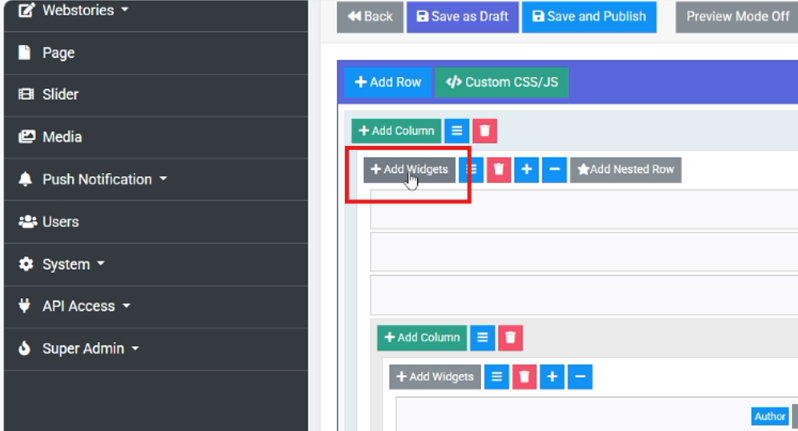
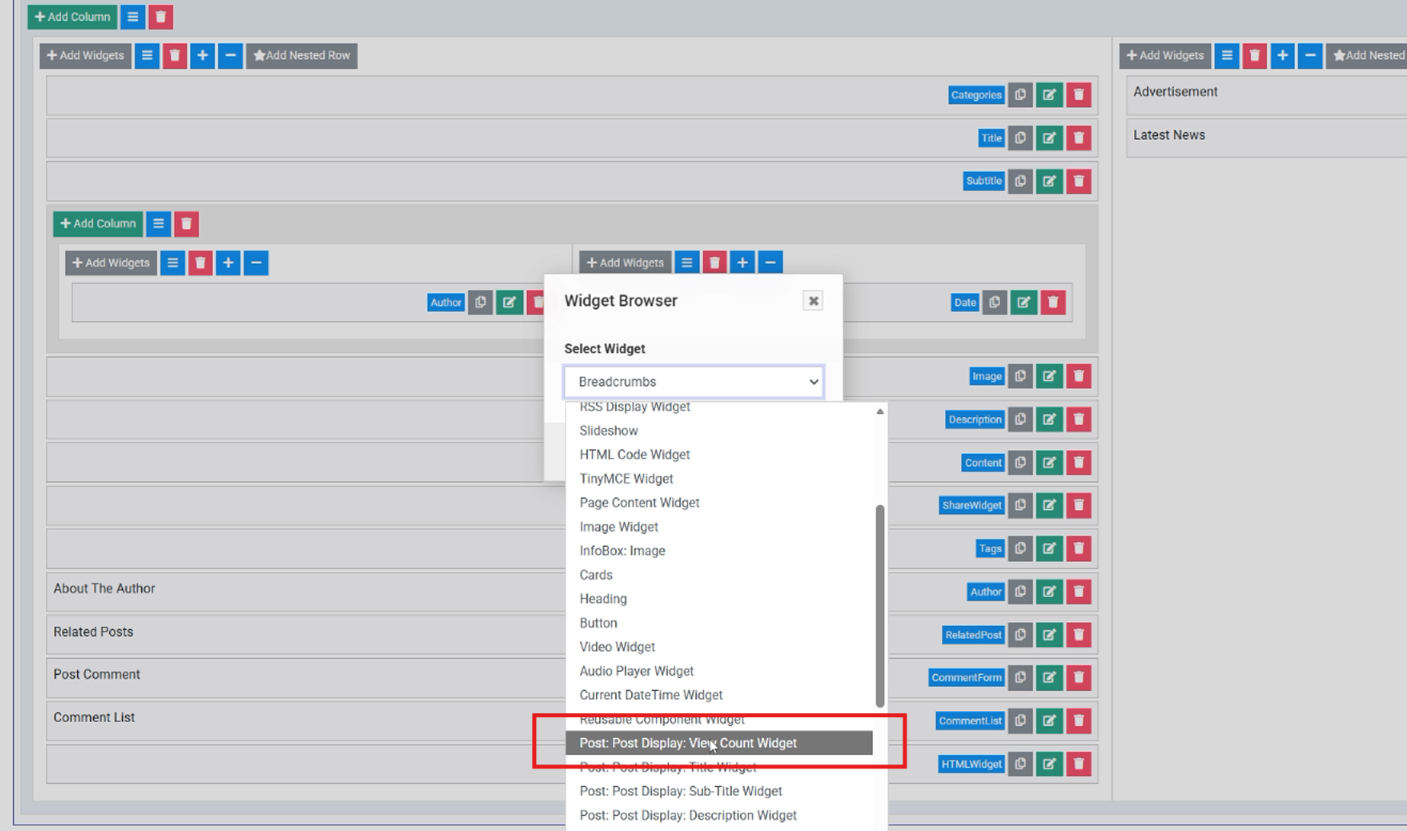
- Choose Post Display View Count Widget
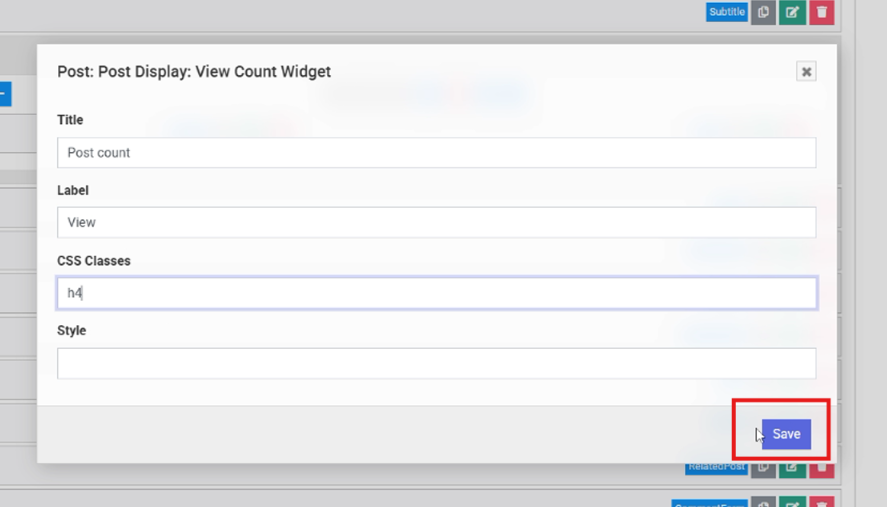
- Add your label & styling (for example):
- Title: “Post Count”
- Label: “Views”
- Class:
H4
- Drag & place the widget below the content
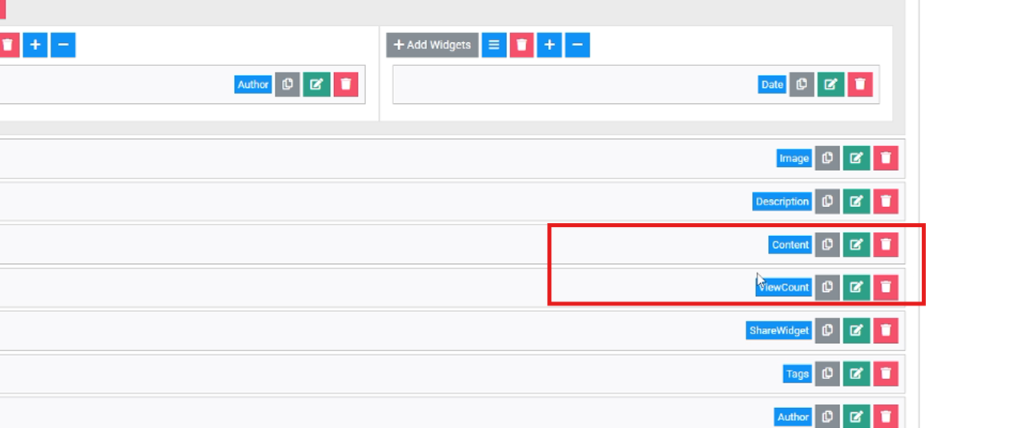
- Click Save & Publish
🎯 Final Results
Once everything is set up, you will be able to:
- See accurate page views for every news post
- Display view count to your audience
- Make data-driven decisions to enhance engagement
🙌 Conclusion
The Post View Feature in Vedanta NewsPortal CMS helps you easily monitor which stories your audience loves the most. With correct tracking and a visible view count widget, your news portal becomes smarter and more powerful.
About the Author

Ankur Gupta
Ankur Gupta is a seasoned software developer and entrepreneur with over 20 years of experience in building innovative digital solutions. He is the founder of Vedanta Software, a SAAS-based platform specializing in Newsportal CMS and ePaper CMS for publishers across India and beyond. With deep expertise in PHP, Yii2, CodeIgniter, ReactJS, Server Management, Linux, and a growing proficiency in Node.js, Ankur is passionate about creating scalable, user-friendly web applications. He is known for his hands-on approach and dedication to quality, mentoring his team to deliver robust and efficient software solutions tailored for the digital publishing industry.
News and Updates
 Introducing AI Automapping: Say Goodbye to Manual Area Mapping
Vedanta Software launches AI Automapping — an AI-powered tool that automatically detects and maps news articles on your epaper pages, so your team can focus on journalism, not box-drawing.
 Featured in INMA: How Vedanta Software Helped a Newspaper Beat Digital Piracy
An Indian newspaper faced serious digital piracy after launching paid subscriptions. Here's how Vedanta Software helped solve it — recognized globally by INMA.
 Vedanta Software Featured in INMA: Leading the Charge Against E-Piracy
Discover how Vedanta Software empowered the daily newspaper Sach Kahoon to successfully combat e-piracy, as featured by the International News Media Association (INMA).
 Vedanta Software is Revising Its SaaS Product Pricing from October 1st, 2025
Vedanta Software revises SaaS pricing for Epaper & Newsportal CMS from Oct 1st, 2025. Renew now at current prices till Oct 31st. Learn more.
 Vedanta Software Recognized as India’s Top Job Creator 2025 By Apna
Vedanta Software has been recognized by Apna as India’s Top Job Creator 2025 for its role in generating employment and empowering businesses with innovative SAAS solutions like Newsportal CMS and Epaper CMS.